Integrating MCP Into Your Product: Why Your SaaS Needs Tool-Calling AI
In Part 1, we understood why MCP matters. In Part 2, we built a universal MCP client. In Part 3, we created the agentic layer. Now let's talk about why this matters for your product — and how to actually integrate it.test

In Part 1, we understood why MCP matters. In Part 2, we built a universal MCP client. In Part 3, we created the agentic layer.
Now let's talk about why this matters for your product and how to actually integrate it.
The Problem: AI Assistants Are Siloed
Your users are already using AI. ChatGPT, Claude, Cursor — they're everywhere.
But here's the disconnect: these tools don't know your product.
When a user asks Claude "what's my account status?", Claude has no idea. When they ask ChatGPT to "update my subscription", it can't. These are generic assistants with no access to YOUR data, YOUR APIs, YOUR workflows.
This creates a fragmented experience:
Users switch between your product and AI tools constantly
They copy-paste data back and forth
They wish the AI just "understood" your product
What if your product HAD that AI — built-in, connected, aware of everything?
The Opportunity: Embedded AI That Actually Does Things
MCP (Model Context Protocol) isn't just another AI standard. It's the bridge between AI and your product's capabilities.
With MCP integration, your product can have an AI assistant that:
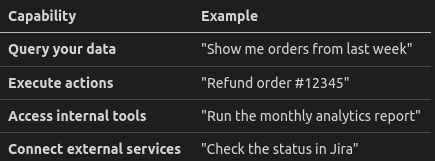
The magic: you don't build this from scratch. You expose your product's features as MCP servers, and the AI just uses them.
The Architecture: How It Fits Into Your Stack
Here's how MCP integration looks in a real product:
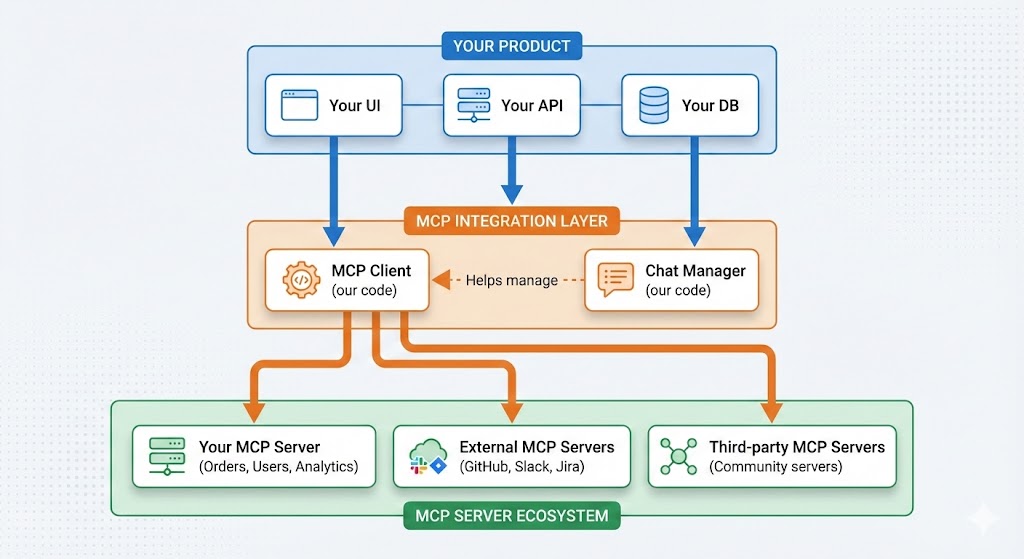
Key insight: The MCP Client and Chat Manager are the same code we built in Parts 2 and 3. They're product-agnostic. You just plug them in.
The Workflow: From Request to Action
When a user interacts with your AI-powered feature, here's what happens:
Step 1: User Intent
User: "What were our top 10 products last month?"
Step 2: AI Reasoning
The LLM understands the intent and identifies which tool to use:
✓ This requires the
analytics.get_top_productstool✓ Parameters:
period: "last_month",limit: 10
Step 3: Tool Execution
The MCP Client calls your Analytics MCP server, which:
Queries your database
Computes the rankings
Returns structured data
Step 4: Response Generation
The AI receives the data and formulates a natural response:
"Here are your top 10 products for November: 1. Product X (1,234 sales)..."
Step 5: Optional Follow-up
User: "Export that to a spreadsheet"
The cycle repeats, now using a different tool.
Total time: 2-3 seconds. No page navigation. No manual queries. Just ask and receive.
The Business Value: Why This Matters
For Your Users
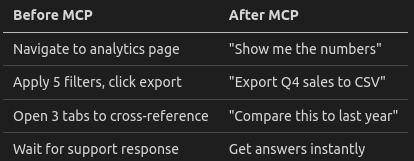
Result: Faster workflows, higher satisfaction, stickier product.
For Your Business
Differentiation: Few products have embedded AI that actually DOES things
Engagement: Users interact more when AI is useful, not just chatty
Support costs: Common questions handled automatically
Upsell potential: AI features as premium tier
For Your Dev Team
Modular: MCP servers are independent, testable units
Standardized: One protocol, any AI provider
Future-proof: Swap LLMs without rewriting integration
Ecosystem: Leverage existing MCP servers for external tools
What You Get: The Complete Package
We've built a production-ready implementation that includes:
Backend Components
UniversalMCPClient: Connects to any MCP server (local or remote)
ChatManager: Handles the AI conversation loop with tool orchestration
REST API: Ready-to-use endpoints for your frontend
Frontend Reference
React Chat Interface: Real-time streaming, tool call visibility
Server Management UI: Add/remove MCP servers dynamically
Collapsible Tool Results: Clean UX for verbose tool outputs
Production Features
✅ Real-time streaming (SSE)
✅ Multi-session support
✅ Persistent history
✅ Error handling
✅ Graceful shutdown
✅ Database layer (SQLite, swap for PostgreSQL)
Integration Paths: Choose Your Approach
Path 1: Full Integration
Embed the entire stack into your product. Best for:
New AI-first features
Internal tools
Standalone assistant interfaces
Path 2: Backend Only
Use the MCP Client and ChatManager in your existing backend. Best for:
Adding AI to existing APIs
Microservices architecture
Custom frontend requirements
Path 3: Component Extraction
Extract only what you need:
Just
UniversalMCPClientfor MCP connectivityJust
ChatManagerfor agentic orchestrationJust the streaming logic for real-time responses
The code is modular by design. Take what serves your use case.
Real-World Use Cases
Customer Support Platform
Connect MCP servers for:
Knowledge base search
Ticket history lookup
Account information
Action execution (refunds, upgrades)
"Refund the last order for customer@email.com" → Done in 2 seconds.
Analytics Dashboard
Connect MCP servers for:
Query builder
Report generator
Data export
Cross-platform data fetching
"Compare our GitHub stars to competitors" → Chart generated.
Developer Tool
Connect MCP servers for:
Code analysis
Documentation lookup
Deployment triggers
Log analysis
"Why did the last deploy fail?" → Root cause identified.
Internal Company Assistant
Connect MCP servers for:
HR systems
Project management
Document search
Calendar integration
"What's the PTO balance for my team?" → Instant answer.
Getting Started
Ready to integrate MCP into your product?
1. Clone the Repository
The complete implementation is available with:
Full source code (Python backend, React frontend)
Detailed documentation
API reference
Example configurations
2. Create Your MCP Servers
Expose your product's features as MCP servers:
Each server = one domain (orders, users, analytics)
Each tool = one action (get_order, create_user, run_report)
3. Connect and Deploy
Plug the MCP Client into your backend, connect your servers, and you're live.
Conclusion: The Future Is Embedded AI
The question isn't whether AI will be part of your product. It's whether it will be:
A generic chatbot that says "I can't help with that"
Or an integrated assistant that actually does things
MCP gives you the second option.
We've done the hard work: building the client, the orchestration layer, the streaming, the persistence. The implementation is ready.
Your job: connect it to your product and watch your users do things they never could before.
→ Access the Full Source Code & Documentation
Related reading:
Enjoyed this article? Share it!