AI Workflows vs Agents: A Developer's Guide to Architectural Decisions

Every week, engineering teams burn $50K on "AI agents" that are just expensive if-statements. Here's how to stop.
The industry has confused API calls with autonomy. The terms "agent" and "workflow" are used interchangeably, but they describe fundamentally different architectural patterns with radically different cost structures and failure modes.
Understanding when to use each—and how to combine them—is the difference between a profitable product and a burning pile of API credits.
The Three Architectural Levels
Every AI system lives somewhere on this spectrum:
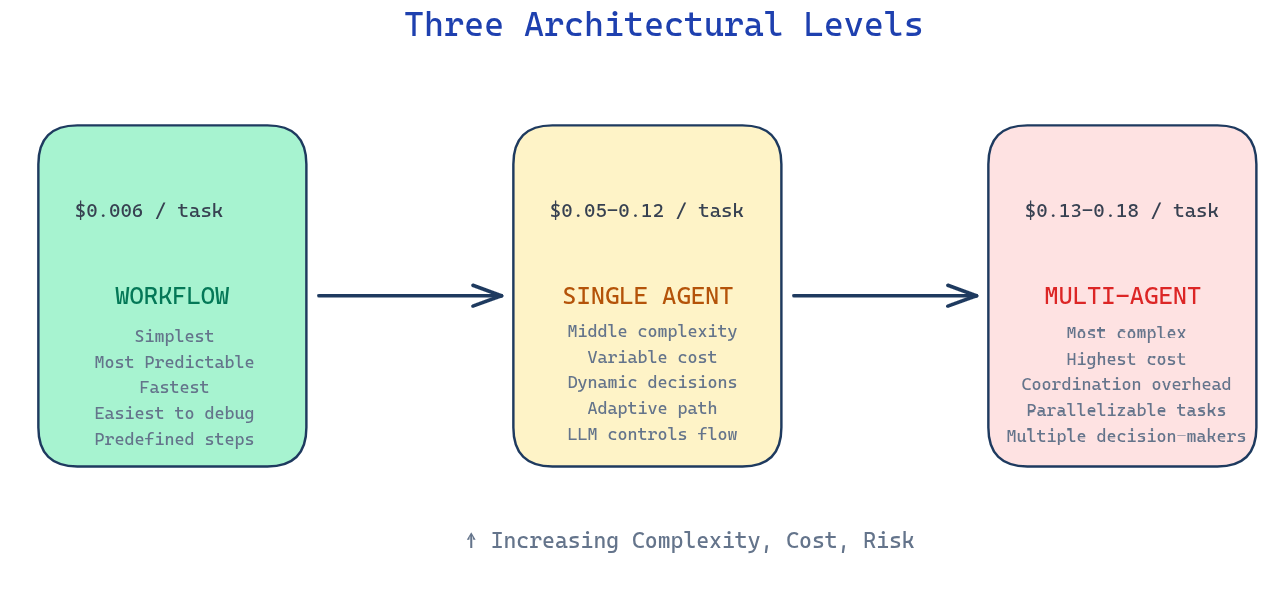
The progression isn't just about capability—it's about cost, complexity, and predictability. Move right only when absolutely necessary.
The Coffee Test (Karpathy)
Here's my diagnostic tool for any AI system:
Start your system with a real task
Go make coffee
Come back
What you see determines your architecture:
Result Architecture Task complete, or failed in an interesting way Agent Waiting for your next instruction Workflow Error on step 3 because step 2 returned unexpected JSON Workflow you didn't test enough
The difference isn't intelligence. It's autonomy.
A workflow is a recipe. You know every step. The outcome varies only because input varies.
An agent is a colleague. You describe the goal. They figure out the path.
The Critical Distinction: Who Controls the Flow?
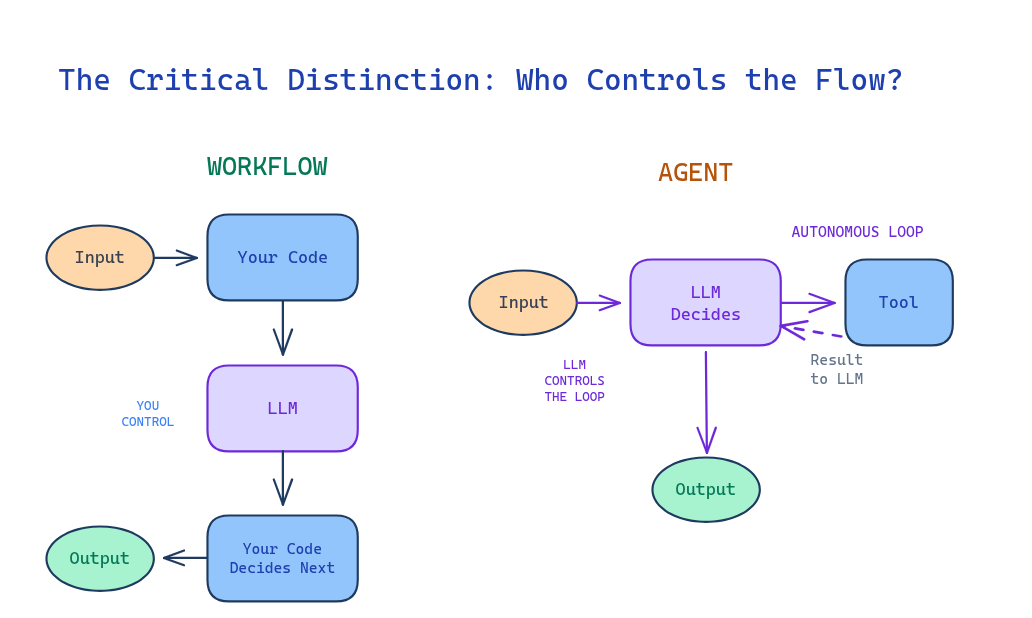
Workflow (Code controls)
Characteristics:
Orchestration by predefined code paths
Predictable execution path
Consistent cost and latency
Easier debugging (clear stack trace)
Agent (LLM controls)
Characteristics:
LLM dynamically directs its own processes
Sequence decided at runtime
Variable cost and latency
Harder debugging (requires observability)
The autonomous loop—feeding tool results back to the LLM to decide the next action—is what separates agents from workflows.
This "System 2 thinking"—deliberate reasoning, reflection, and recognizing knowledge gaps—enables agents to "make a plan by exchanging with you and understanding your needs, iterating at a 'reasoning' level" .
When to Use Each
Use WORKFLOWS when:
Steps are known and stable
You can write the recipe before coding
The process is the same regardless of input
You need predictable costs and latency
Real example—Invoice Processing:
A fintech company processes 50,000 invoices monthly:
PDF upload → OCR extracts text ($0.001) → Regex parses line items
    → Python calculates tax → Template generates PDF → Email service sends
Cost: $0.002 per invoice. Predictable. Fast. No AI decisions required.
Use SINGLE AGENT when:
The order of work is not fixed
Step 1 affects what Step 5 should be
Fewer than 20 tools (see rule below)
Tasks are tightly coupled
Real example—Debugging at 2 AM:
Dev: "Users getting 500s on checkout. Find why."

Agent:
1. Queries logs → "DB connection timeouts"
2. Reads config → "max_connections: 10, current: 45"
3. Identifies root cause: pool exhausted
4. Proposes fix: increase to 50
5. Applies fix after confirmation
The developer didn't say "check logs" or "read config." The agent decided what to investigate based on findings.
Cost: Variable. $0.05-0.50 depending on exploration depth.
Use MULTI-AGENT when:
Use Multi-Agent Avoid Multi-Agent Breadth-first queries with parallelizable subtasks Tasks requiring shared context or tight coordination Information exceeding single context windows Coding tasks with fewer parallelizable steps High-value tasks justifying token costs Real-time delegation scenarios
The key insight from production: "Read actions are inherently more parallelizable than write actions." Claude Research uses multi-agents for research (reading) but "a single main agent" for synthesis (writing).
The 10-20 Tool Rule
"A single agent tends to work best with roughly 10 to 20 tools. Past that threshold, tool selection degrades." — Anthropic
This is context rot. More tools = more noise competing for the model's attention.
Solutions:
Dynamic loading: Only show relevant tools ("DB tools" only when querying databases)
Tool grouping: One "database" tool with parameters vs. 10 separate DB tools
Reconsider architecture: If you need 30+ tools, you might have multiple domains needing multi-agent
The Five Workflow Patterns
Before building an agent, check if these patterns suffice:
1. Prompt Chaining
What: Sequential steps, output feeds input.
Example: Outline → Section 1 → Section 2 → Edit → Final
Use when: You know the sequence. Each step builds on the last.
2. Parallelization
What: Independent tasks running concurrently.
Example: Content moderation running toxicity + spam + policy checks simultaneously.
Use when: Tasks don't depend on each other. You need speed.
3. Routing
What: Classify input, branch to handler.
Example: Support ticket → Billing / Technical / General queues.
Critical insight: This is often a keyword match, not an LLM call. A startup used GPT-4 ($0.15/classification) for routing. We replaced it with regex + embeddings ($0.002/classification). Same accuracy. 75× cheaper.
4. Orchestrator-Workers
What: Central coordinator delegates to specialized workers.
Example: Code review where orchestrator decides which checks (security, performance, style) are relevant based on changed files.
Use when: Sub-tasks vary based on input, but coordination is centralized.
5. Evaluator-Optimizer
What: Generate → Evaluate → (Good? Output : Revise → Loop)
Example: Draft email → Check tone → Revise → Check again → Send when >8/10.
Critical: Always set max iterations. Infinite loops are expensive.
Hybrid Architectures: The Production Reality
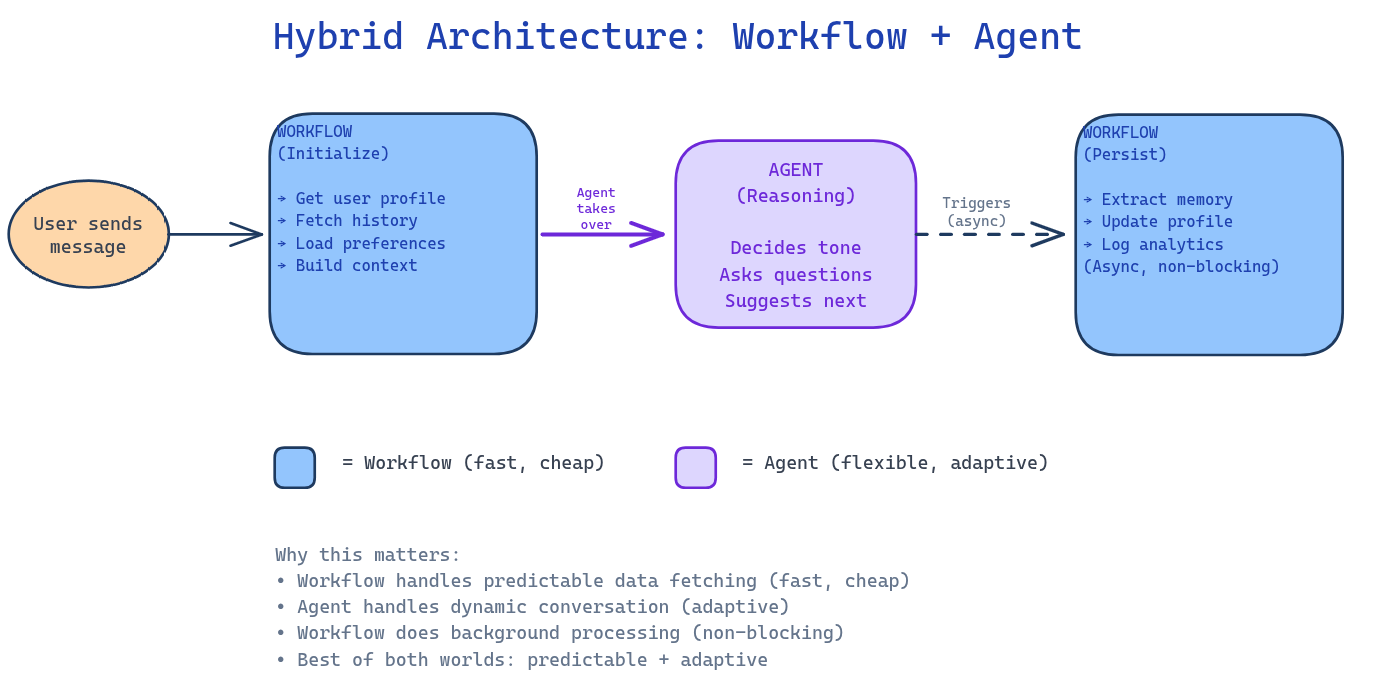
Here's what most blog posts won't tell you: production systems rarely choose between workflow OR agent. They use BOTH.
Example: The Smart Chat Assistant
WORKFLOW (Initialization):
User sends message
    ↓
Workflow retrieves user profile from DB
    ↓
Workflow fetches recent conversation history
    ↓
Workflow loads user preferences (timezone, language, tier)
    ↓
Workflow constructs system prompt with all context
    ↓
AGENT takes over for response generation
The workflow handles the predictable data fetching. It's fast, cheap, and deterministic.
The agent handles the conversation. It decides tone, asks clarifying questions, suggests next steps.
Why this matters: If you made the agent retrieve user data, you'd burn tokens on SQL query generation for something a simple DB lookup does better. If you made a workflow generate responses, you'd have rigid, robotic replies.
Cost Reality: The Numbers Matter
Architecture Cost/task 10k tasks/month Predictability Workflow (5 steps, GPT-4o-mini) $0.006 $60 ✅ Totale Single Agent (GPT-4o, 3-8 calls) $0.045-0.12 $450-1,200 ⚠️ Variable Multi-Agent (3 agents, 9-12 calls) $0.135-0.18 $1,350-1,800 ❌ Complexe
The question: Is the flexibility worth 20-30× the cost?
Sometimes yes (debugging at 3 AM). Often no (invoice processing).
As [Bouchard] emphasizes: "Your money and time aiming for true agents should be saved for really complex problems that we cannot solve otherwise."
Common Anti-Patterns
Anti-Pattern 1: The Over-Engineered Router
You build an "Agent" that classifies input and routes to handlers.
Reality: That's an if-statement.
Test: Can you replace it with:
if "billing" in message: return billing_handler
elif "technical" in message: return tech_handler
If yes, do it. Save the $0.10/classification.
Anti-Pattern 2: Agent Theater
Every LLM call is an "agent." Your diagram has 47 "agents."
Reality: If it doesn't dynamically choose tools, it's not an agent. It's a function.
The test: "Can this component act independently, make decisions, or do anything beyond the predefined path?"
If no, it's a workflow.
Anti-Pattern 3: Chatty Agents
Agents constantly messaging each other. JSON flying everywhere.
Reality: Every handoff is latency, cost, and failure points.
Rule: If two agents talk more than twice for one task, they should be one agent.
This is especially true for coding tasks. notes: avoid multi-agent for "coding tasks with fewer parallelizable steps" and "tasks requiring shared context or tight coordination."
Anti-Pattern 4: Future-Proofing
"We might need multi-agent later, so let's build it now."
Reality: YAGNI (You Ain't Gonna Need It).
Better: Build the simplest thing. Measure where it breaks. Add complexity only when needed.
You'll understand the problem better by then anyway.
Anti-Pattern 5: Vague Subagent Instructions
In multi-agent systems, unclear instructions cause duplication or gaps.
From LangChain's production experience: "Vague subagent instructions cause duplication or gaps."
Be explicit. Define clear contracts between agents.
The Decision Tree
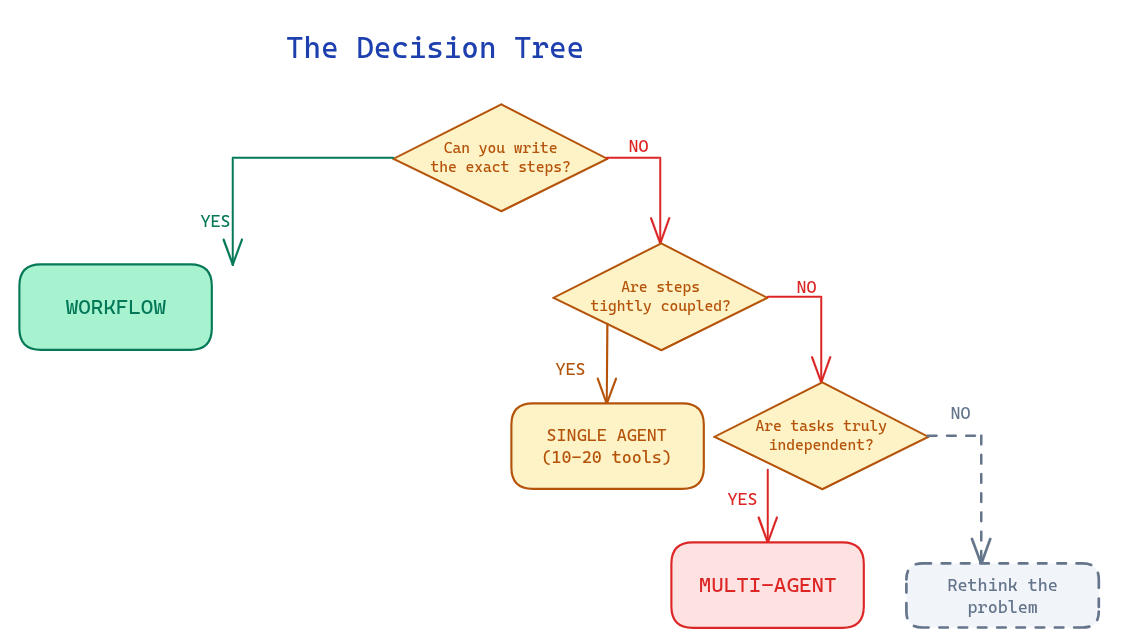
Advanced consideration: Most production systems use hybrid architectures:
Workflow initializes context → Agent handles dynamic reasoning → Workflow stores results
Agent explores → Workflow structures → Agent synthesizes → Workflow formats
Production Requirements
Whether you choose workflow, single agent, or multi-agent, certain infrastructure is non-negotiable:
Requirement Why It Matters Durable execution Resume from where the agent was when errors occurred Tracing/debugging "Were the agents using bad search queries? Choosing poor sources?" Evaluation infrastructure Start small (~20 datapoints), use LLM-as-judge, maintain human testing Context engineering "Doing this automatically in a dynamic system"—not just prompt writing
Key Takeaways
Not every LLM application is an agent (Anthropic, Bouchard)
The autonomous loop is the differentiator—LLM decides next action, not predefined code
Always start with workflows—predictable, cheap, testable
The simplest system that works is the best system
10-20 tools max per agent—beyond that, context rot degrades performance
Cost difference is 20-30×—workflows $0.006, agents $0.12, multi-agent $0.18 per task
If agents talk more than twice, merge them—especially for coding tasks
Production systems combine both—Workflows for data fetching/background tasks, agents for dynamic reasoning
Save agents for complex problems—"Your money and time aiming for true agents should be saved for really complex problems that we cannot solve otherwise" (Bouchard)
Build evaluation from day one—"More evals ≠ better agents. Instead, build targeted evals that reflect desired behaviors in production."
What's Next: The Complete Series
This article covered the architectural foundations. The complete series builds production-grade agent systems covering: Context Engineering, Tool Calling with MCP integration, Structured Outputs, RAG & Retrieval, Planning & Patterns (ReAct, Plan-and-Execute, Reflection), Memory Systems, Agent Harness architecture, Multi-Agent Systems, Self-Healing Agents, Multimodal Agents, Sandboxing & Security, MCP (Model Context Protocol), AI Environment Setup, and Evaluation & Observability—all implemented from scratch(if i have time) or with LangGraph/LangChain, culminating in a complete deployable system.
All with Python code, working examples, and production patterns.
References
Andrej Karpathy — "Software in the era of AI" (YC talk)
What architecture are you using? Have you measured the cost difference between your workflow and agent implementations?
Enjoyed this article? Share it!